
Conducting evaluative research on a new “book appointment” feature
Company: Nice Healthcare
Project duration : 1 month
My role
I served as the sole UX Researcher on a Product team comprised of three Product Managers, three Designers, and ten Engineers. For this project, I coordinated all research activities, which included:
crafting a research plan
recruiting care coordinators
scheduling 1:1 moderated usability testing sessions
conducting moderated usability tests
synthesizing results, heat maps, and feedback in order to provide recommendations to Senior Product Designer
keeping stakeholders abreast of the product roadmap
organizing our research repository to include these findings in an easily accessible and searchable manner
The challenge
Nice Healthcare was continuing to grow and develop more in-house applications. They were using Acuity to schedule virtual and in-person patient visits. As a business, they aimed to create a proprietary scheduling tool tailored to the company's specific care delivery model, enabling greater scalability. Before this research project, my colleagues and I conducted an in-depth analysis of the scheduling experience for our Care Coordinators. Based on that research, we initiated the design of a new “book appointment” flow.
The overall research objective for this particular project was evaluative. Specifically, we aimed to understand whether Scheduling Care Coordinators felt they had sufficient information to make informed scheduling decisions with the current prototype and to identify any barriers to adopting the new tool.
The research methodology
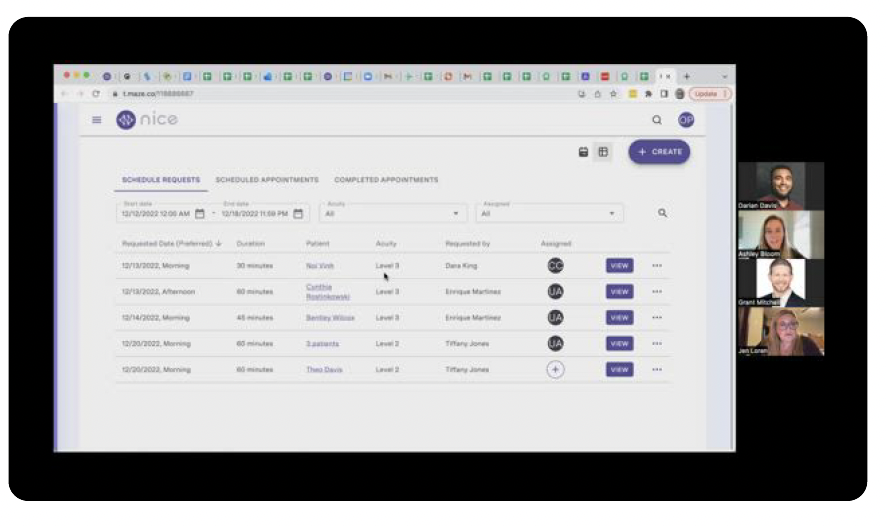
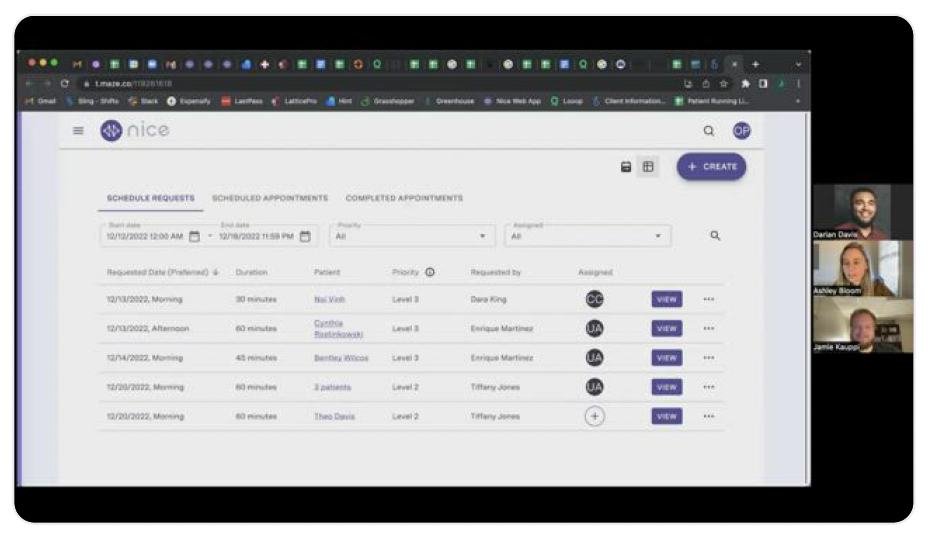
My approach for this research project was to dedicate 1:1 time with every Care Coordinator involved in scheduling at Nice at the time that the research was conducted. This allowed me to conduct moderated usability tests and analyze the usability of the current book appointment prototype. I held 30-minute meetings with six Care Coordinators who schedule appointments, considering perspectives from both frequent schedulers and those less experienced in scheduling. These moderated usability tests were conducted via Zoom, with participants sharing their screens as they navigated through a prototype sent to them in Maze, one of our research tools. Instead of simply sharing the link to the prototype in Figma, I decided to maximize the potential of our available tools by creating a "mission" in Maze. This integration allowed us to seamlessly connect with Figma, enabling us to benefit from both moderated and "unmoderated" usability testing. We were able to guide participants, answer questions in real-time, and leverage the analytics provided in Maze, including heat maps, misclick rates, the overall usability score, and more.
Joining me on these calls were one of our Senior Product Designers, who created the prototype, and our Director of Product Management, who was PMing the project.
I crafted a script to walk them through booking an appointment, only sharing the minimum details necessary, such as “Book an appointment for Noi Vinh with Provider Jones on April 1st, 2023.”
The results
The results from this research project were overwhelmingly positive from a usability standpoint, and they also illuminated a few key areas for “quick wins” for our designer, and further areas to conduct research.
Usability: All Care Coordinators were successful in booking two appointments
While we asked clarifying questions to each participant throughout the usability session, at no point did I, as the moderator, have to coach participants into successfully booking appointments. This was a remarkable achievement in terms of usability. It also spoke volumes to the prior research I had conducted with the team, as further evidenced by a participant saying, “It’s clear that you spent a significant amount of time with Care Coordinators to understand our day-to-day work flows and processes.” In my internal research report, I also compiled a highlight reel with clips from our sessions that demonstrated joyful moments that our Scheduling Care Coordinators experienced interacting with the prototype. (Yes, I had a qualitative coding group just for moments that conveyed “joy” 😀)
Terminology: “Priority” was less confusing than “Acuity”
Care Coordinators at Nice were accustomed to viewing Schedule Requests listed by “Acute” vs. “Chronic.” When working to improve upon that binary, the first iteration of our prototype had levels of “Acuity,” which didn’t prove to be as useful as hoped. For our remaining moderated usability sessions, we pivoted and included prototypes with the word “Priority” which was less confusing overall.
“Nice to have” functionality
Our Care Coordinators were overall very content with the latest designs for the new “Book Appointment” feature, but of course, they also had aspirations for even more enhancements. I always make it a priority to allow users the space to think outside of the box and share their hopes and dreams with me as a researcher. I often ask questions such as, “If you had a magic wand and could make one improvement to “x”, what would it be?” I also put them at ease by reminding them that I want them to share “the good, the bad, and the ugly” because that’s the only way that we can improve as a team and as a company. Of course I never make promises that we will implement their suggestions, but this generous and collaborative approach with research participants has garnered invaluable feedback that might otherwise be missed. In the case of this particular research, Care Coordinators expressed a desire for a Google Maps integration to show real-time traffic, and a confirmation page with assurance that all was successful in the new scheduling tool!
Opportunities & Recommendations
In addition to the insights uncovered above, I also shared the following with the team working on this project:
Removing Acute vs. Chronic designations in the Schedule Request queue will be a significant change for Care Coordinators. Replacing “Acuity” with “Priority” helped bring clarity and usefulness to that category, but additional training from Care Coordination team leaders will be important change management here.
Care Coordinators reasonably have a history of distrust of technology (the integration between Acuity, our EMR, and Google Calendars was often fraught and painful) which might be a barrier to adopting the new scheduling tool fully and trusting its accuracy. What they’ve told us would be helpful? Being able to view a confirmation that the appointment was successfully booked (with some proof).
Next steps
I always partner with designers, product managers and engineers to develop appropriate next steps based on the research. In this case, I recommended the following:
🎯 Implement any high impact/low effort “Nice to haves” into designs.
🎯 Conduct additional research around the use case of scheduling any appointment with labs. We started to hear some really useful information about Care Coordinator expectations around lab collection instructions and want to dig deeper into that particular flow during our next iteration of research.
Tools & methods: Moderated usability testing, evaluative research
Zoom, Maze, Miro, Figma, Dovetail
The takeaway
As a UX Researcher working on the Product team at Nice Healthcare, I conducted moderated usability testing sessions with Care Coordinators in order to uncover any usability issues and to identify potential barriers to adoption. I leveraged my critical thinking skills to craft a research plan that allowed us the opportunity to engage real-time with participants, while also gathering analytics from our remote usability testing platform. This provided rich user insights that drove further design and development of an in-house scheduling tool for a healthcare startup.